Easy Terminal
Run coding agents and shells in one native Mac workspace, then return to their conversations and files.
Keep parallel agent work in view
Easy Terminal brings coding agents and shells into one native Mac workspace. Keep an agent building, another reviewing, and a shell ready for commands. Move between a focused terminal and an overview of your sessions without losing track of where the work is happening.
The app hosts installed command-line tools, including Claude Code, Codex, Cursor CLI, Muse Spark, and shells. Each provider keeps its own sign-in, permissions, models, and usage charges.
See how the sessions connect
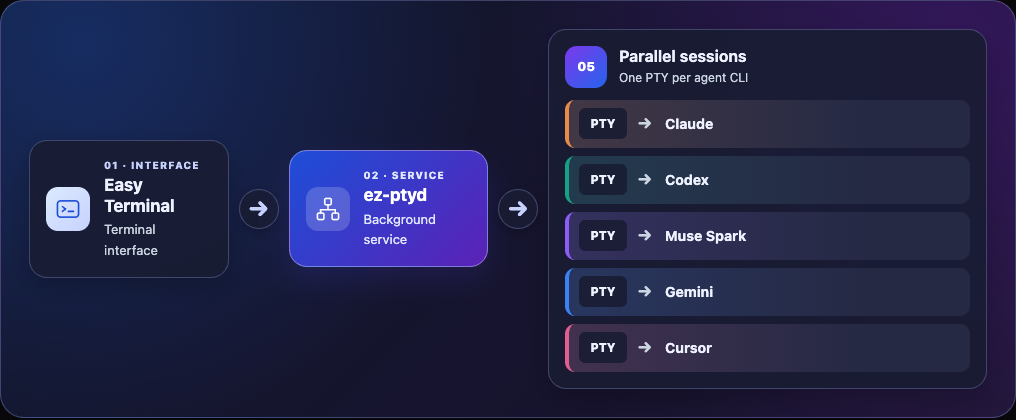
This conceptual example gives each agent its own PTY and process. Open the image at full size.
Know where a task stands
Supported provider recordings help distinguish a working agent, a completed turn, and an interrupted task. When the evidence is missing, the status stays unknown. Conversation links let you inspect the recorded context behind a session.
Teams bring related sessions together around an objective. In a coordinated workflow, a designated lead assigns tasks, members report results or blockers, and the lead reviews their contributions. Creating a group alone does not start that workflow, and sending a task does not prove it was accepted or completed.
Files stay close to the work: attach, paste, or drop a local path into a session, and inspect supported images beside the terminal.
Close the window without ending the work
Easy Terminal’s background service, ez-ptyd, manages the running terminal sessions separately from the interface. Reopening the app can reconnect to those sessions while their processes remain alive.
A Mac restart, daemon exit, or explicit stop can end a live session. Saved output lets you review what happened; continuing a provider conversation depends on that provider’s resume support.
Why I’m building it
Running more agents is useful only if their work stays understandable. I’m building Easy Terminal to make it easier to see who is working on what, direct the next task, and review the result. The learning guide explains the core concepts behind that experience.
Try the invited alpha
Easy Terminal is preparing a free invited alpha for Apple silicon Macs running macOS 14 or later. The next step is to validate setup and daily use with a small group. There is no public download yet. Join early access.
The app currently uses a proprietary license and its source repository is private. Broader distribution, future pricing, and whether to open parts of the source remain undecided. Third-party components retain their own licenses.