Speak Savvy
iOS speaking coach. PREP and STAR drills, vocal-delivery scoring, on-device speech analysis. Composite communication score across seven dimensions.
The Problem
Speaking skills degrade without practice, and practicing alone provides no feedback. You can rehearse an interview answer in the mirror, but you won’t catch filler words, pacing issues, weak vocal delivery, or structural problems. Professional coaching costs hundreds per session. Recording yourself helps but requires manual review afterward — and most people never sit down to do it.
What I Built

A native iOS speaking coach. You pick a drill, get a prompt, speak your response, and get a transcript with inline analysis plus a vocal-delivery scorecard — all on-device. Audio never leaves the phone.
Drills
The app ships with eight drills, each tuned for a specific weakness:
Flash Answer — fast PREP-style answers (Point → Reason → Example → Point) to general-interest prompts in 60 seconds. Coach pick by default for new users.
Filler Chisel — pace and filler-word elimination, with stricter thresholds than the default scoring.
Roleplay Interrupt — handling cross-talk, pivots, and recovery after being talked over.
Explain Simply — technical explanation to a non-technical audience. Scores jargon density and suggests simpler alternatives.
Interview Prep — STAR-format behavioral answers (Situation, Task, Action, Result). Section detection flags when an answer skips Task or under-develops Result.
Story Craft — narrative arc and beat pacing for longer answers.
Metaphors — reaching for the right comparison under time pressure.
Paraphrasing — restating without losing meaning, scored on coverage and brevity.
Recording a Response

Tap the mic, speak your answer, tap stop. The pulsing record control gives ambient feedback that the mic is live; the elapsed counter keeps you honest about pace. Restart is one tap away if you flub the start. Apple’s Speech framework handles transcription with word-level timestamps in real time.
Score Breakdown

Each response gets scored on five primary dimensions on a 1-5 scale (Structure, Relevance, Fluency, Pace, Conciseness — the home dashboard rolls these up across recent sessions into a 7-dimension composite). The horizontal bars use color to flag what’s dragging the score down: green for on-target, amber for borderline, red for needs work.
The metric tiles below the score breakdown surface concrete numbers — words per minute against your target band, fillers per minute against the threshold, total words, duration. Each tile expands. The “Off target” / “Under limit” labels under each metric anchor the number to a coaching judgment, so you don’t have to interpret raw stats yourself.
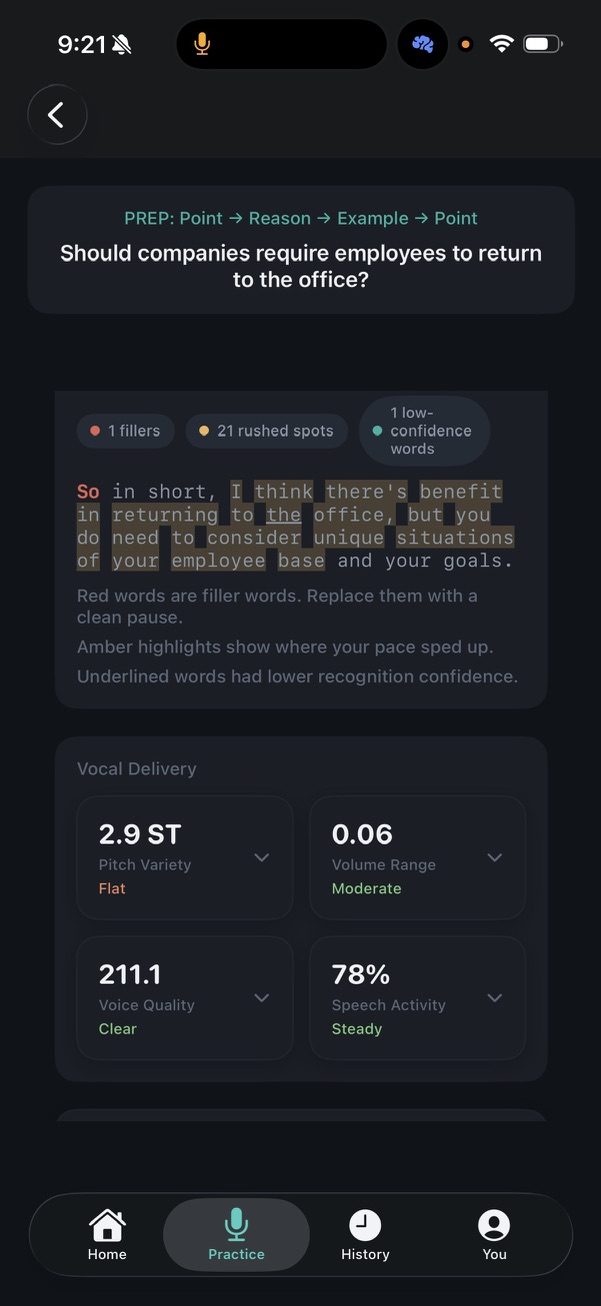
The chips at the top of the transcript section preview what the inline annotation will show: the rushed-spots count, dragging-spots count, and low-confidence count. Tap a chip to filter the transcript view to just those moments.
Inline Transcript Analysis
The transcript renders with three highlight types layered on the same text:
- Red — filler words (“So…”, “um”, “you know”). The chip shows the count for the response.
- Amber — rushed spots where pace spiked above your baseline. Sensitive to micro-bursts, not just long stretches — a response can have 21 amber spans in a 30-second answer.
- Underlined — words the speech recognizer flagged as low-confidence, usually a signal of mumbling or trailing off.
The legend below the transcript explains each marker so you can read it cold the first time.
Vocal Delivery
The scorecard scores delivery on independent dimensions:
| Metric | Unit | What it measures |
|---|---|---|
| Pitch Variety | semitones | Range of pitch movement. Low (<3 ST) = monotone (Flat), high = expressive |
| Volume Range | normalized 0-1 | Dynamic range across the response. Moderate is the target |
| Voice Quality | composite Hz/clarity | Vocal fold stability. Clear means no breathiness or strain |
| Speech Activity | % | Share of the response that’s actual speech vs silence/breathing. Steady means consistent throughout |
Each tile expands to show the per-second curve and what changed where. Pitch variety uses YIN pitch detection on-device, not a cloud model.
Technical Decisions
On-device only — Apple’s Speech framework handles transcription with word-level timestamps. AVFoundation manages audio capture. Filler-word detection runs through Apple’s Natural Language framework. YIN pitch detection runs natively. No audio, no transcripts, no scores leave the device. The privacy story isn’t a feature — it’s the architecture.
SwiftData over Core Data — Sessions, drills, and per-metric history are simple structured records. SwiftData’s macro-based models keep the persistence layer thin without giving up migrations.
Local-first — No accounts. The app works on a plane. The trade-off is no cross-device sync; the win is zero backend cost and zero privacy disclosure burden. Currently distributed via TestFlight.